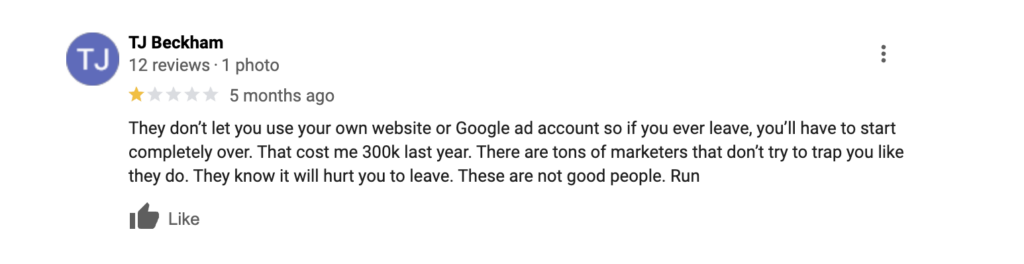




Picture this: You’ve built your HVAC business from the ground up. You’ve invested in your website, your Google Ads account, your customer reviews, and your email list. Years of work. Then your agency disappears, merges, or gets fired. You call to transfer your Google Ads account, and you get this message:
“This account is the property of [Agency Name]. Access denied.”
Your stomach drops. All those booked jobs, that customer data, that lead history, the keywords you’ve spent thousands optimizing—locked away behind a digital wall. You can’t move to a new agency. You can’t manage it yourself. You’re hostage to someone else’s decisions.
This isn’t hypothetical. We see it almost every month.
Contractors have lost access to their websites, their ad accounts, their customer lists, and their review profiles. Some paid years of “recovery fees” to regain control. Others had to rebuild from scratch. One roofing contractor in the Midwest lost 18 months of lead data when his agency shut down and wouldn’t release his Google Ads account.
Don’t let this happen to you.
Protect Your Assets. You Own Them.
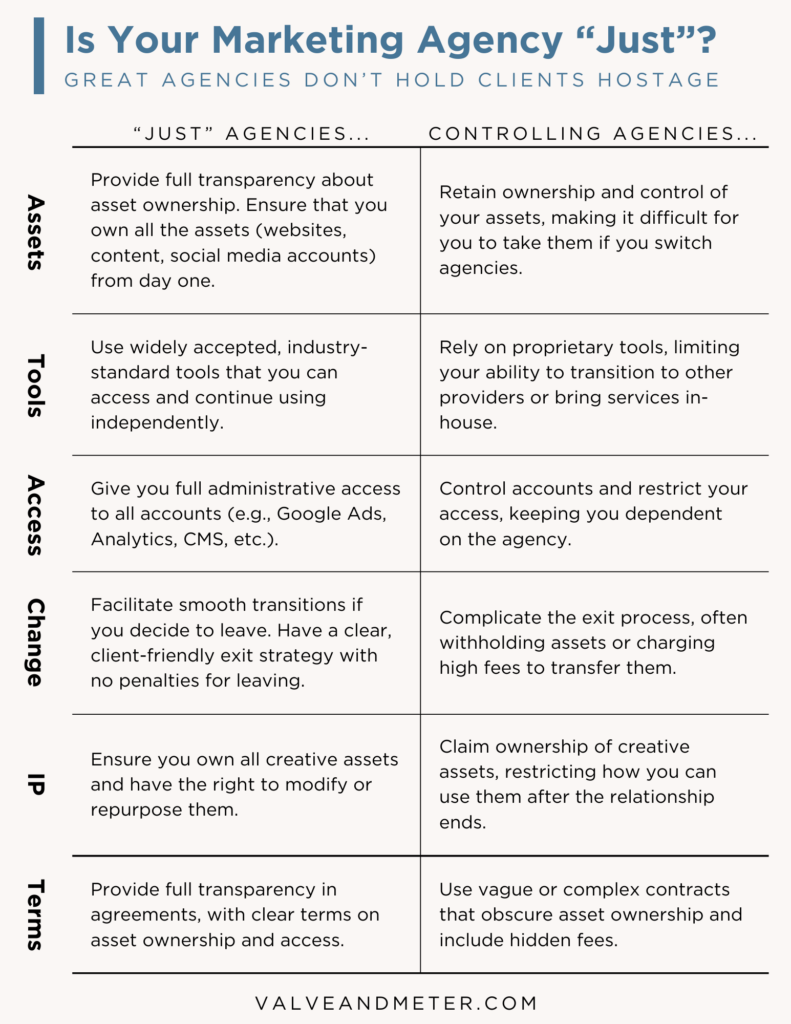
At Valve+Meter, one of our core values is “Be Just.” We believe every contractor owns the assets they invest in. Your website is yours. Your Google Ads account is yours. Your customer data is yours. Your reviews are yours.
We provide full transparency from day one. You get admin access to everything. You’re never locked in. If you leave us, you walk away with all your data intact. That’s how it should work.
The Damage Controlling Agencies Do
When an agency controls your digital assets, you’re vulnerable. Here’s what contractors lose:
Website Hostage Situation
If your agency controls your domain, your hosting, and your website files:
- Years of content vanishes. Pages you built, blog posts you wrote, SEO wins you achieved—gone. You can’t take them with you.
- Domain transfer gets blocked. You can’t move your domain to a new host. You’re stuck with their registrar and hosting.
- Search rankings tank. Moving a website to a new host, rebuilding your file structure, resetting your CMS access—all of this kills your local search rankings temporarily. You lose calls during the transition.
- Email disruption. If your domain email is hosted through your agency, you lose access to it. New leads and past customers can’t reach you.
- Security is a mess. You can’t update your SSL certificate, patch security holes, or set up your own security protocols.
PPC and Lead Generation Account Control
Your Google Ads account is a living, breathing record of what works. Google’s algorithm learns from years of conversion data. When you lose access:
- All historical data disappears. Negative keywords you’ve refined for two years. Audience lists you built. Conversion tracking that’s been feeding Google’s machine learning. Gone. A new account has to start learning from scratch.
- Learning phase restarts. Google’s algorithm treats a new account like a newborn. It learns what works slowly. Your cost per lead (CPL) spikes. You might pay 2-3x more for the same quality lead while Google relearns optimal bidding.
- Keyword research is lost. Years of keyword testing, bid optimization, and ad copy split-testing vanish. The new agency or in-house team rebuilds from scratch.
- Ad campaigns go dark during transition. If you’re switching agencies or bringing it in-house, your ads can be down for days or weeks. Competitors swoop in and take your calls.
Customer Data Loss
If an agency owns your customer list, your CRM, and your review accounts:
- You can’t see who’s been calling. Lead source data, prospect contact info, conversation history—you don’t have it.
- Review management is blocked. You can’t respond to negative reviews or encourage satisfied customers to leave reviews.
- Email marketing stops. You can’t reach past customers with seasonal offers, maintenance reminders, or new service announcements.
Own Your Google Ads Account
Your Google Ads account is your most valuable paid asset. Here’s why losing it is catastrophic:
When you lose access and create a new account, you lose all signal to Google’s algorithm. Google’s Smart Bidding and Performance Max campaigns rely on conversion data. Without that history, Google has no idea what works. Your cost per job rises. You’re competing blind.
Example: An electrician’s agency controlled his Google Ads account for four years. He switched agencies and couldn’t access the old account. The new account had to relearn targeting, bidding, and audience data from zero. His CPL went from $35 to $85 for three months while the new account gathered data. He lost 40+ job opportunities during that transition.
The fix is simple: You own the Google Ads account. Your agency manages it with agency-level access, not admin access. You can see all data. When you leave, you’re in control.
How to Protect Yourself
1. Establish Clear Ownership in Contracts
Your contract must state clearly:
- You own all accounts created for your business (Google Ads, Facebook Ads, Google Business Profile, email lists, CRM data).
- All intellectual property—website content, ad copy, design files—belongs to you.
- Upon contract termination, the agency transfers all accounts, passwords, data, and files to you within 30 days.
- No termination fees tied to account access.
2. Maintain Admin Access to Everything
You must have admin-level access to:
- Your Google Ads account
- Your Google Business Profile
- Your website hosting and domain
- Your Google Analytics and Google Tag Manager
- Your email marketing platform
- Your CRM
- Your social media accounts
- Any other marketing platforms you’re paying for
Never let an agency create accounts in their name. Always use your name, your email, your business address. Your agency gets manager-level access, not owner access. There’s a difference.
3. Use Your Own Accounts
Don’t let an agency create accounts in their name and then “invite” you. You create the accounts under your business name. Your email. Your payment method. Your phone number for two-factor authentication. Then you add the agency as a manager or team member.
This ensures:
- You can remove them instantly if needed.
- Account history stays with you if you switch agencies.
- You see all billing and performance data directly.
4. Document Everything
Keep records of:
- All account login credentials (in a secure password manager like 1Password or LastPass, not a spreadsheet).
- Every campaign you’re running, with screenshots of targeting, budgets, and performance.
- All custom audiences, keyword lists, and ad copy variations.
- Email subscriber lists (export regularly).
- Google Analytics reports (download quarterly).
- Customer data and CRM records (backup monthly).
If your agency disappears, you need proof of what was running and how it performed.
5. Regular Audits
Every quarter, verify:
- You can log into all accounts directly. Try it.
- Your payment methods are on file (not the agency’s).
- No unauthorized users have admin access.
- Account recovery email is your email, not the agency’s.
6. Transition Plan Before You Leave
If you’re switching agencies, develop a timeline:
- Month 1: Request all account access. Test that you can log in.
- Month 2: Export all data (customer lists, campaign histories, analytics).
- Week 1 after new contract starts: New agency sets up parallel accounts while old ones run.
- Week 2-3: Test new accounts. Make sure new campaigns are performing.
- Week 4: Pause old campaigns. Shift budget to new accounts.
Don’t go dark. Run both in parallel for 2-3 weeks. Then sunset the old ones once the new ones prove out.
Critical Assets to Control
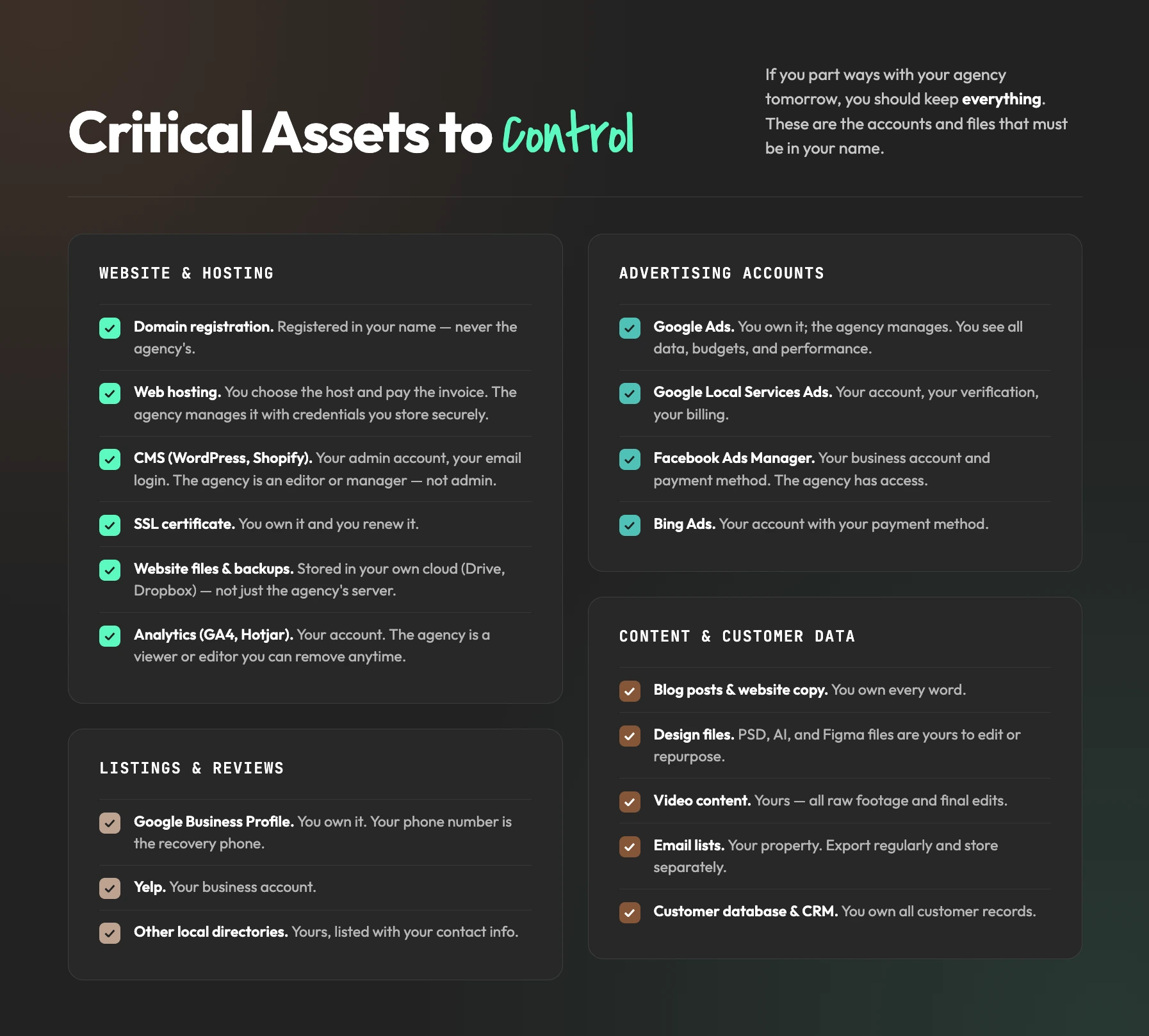
Website and Hosting
- Domain registration: Must be registered in your name.
- Web hosting: You choose the host. You pay the invoice. Agency manages it with access credentials you store securely.
- CMS (WordPress, Shopify, etc.): Your admin account. Your email login. Agency is an editor or manager, not admin.
- SSL certificate: You own it. You renew it. Agency doesn’t.
- Website files and backups: Store backups in your own cloud storage (Google Drive, Dropbox, etc.). Not just the agency’s server.
- Analytics (Google Analytics, GA4, Hotjar): Your account. Agency is a viewer or editor. You can remove them anytime.
Advertising Accounts
- Google Ads: You own it. Agency manages. You see all data, budgets, performance.
- Google Local Services Ads: Your account. Your verification. Your billing.
- Facebook Ads Manager: Your business account. Your payment method. Agency has access.
- Bing Ads: Your account with your payment method.
Listings and Reviews
- Google Business Profile: You own it. Your phone number is the recovery phone.
- Yelp: Your business account.
- Other local directories: Yours. Your contact info.
Content and Customer Data
- Blog posts and website copy: You own it.
- Design files: PSD, AI, and Figma files are yours. You can edit or repurpose them.
- Video content: Yours. All raw footage and edits.
- Email lists: Your property. Export regularly. Store separately.
- Customer database and CRM: You own all customer records.
What to Do if You’re Locked Out Now
If you’re already stuck with a controlling agency:
- Understand your legal rights. Review your contract. Get a lawyer’s opinion. Many controlling clauses don’t hold up in court.
- Request account access in writing. Email the agency. Say you want admin access to all accounts tied to your business. Document the request.
- Escalate internally. If the agency drags its feet, contact their legal department or business operations. Sometimes this gets things moving.
- Offer to pay a transition fee. Some agencies will transfer access for a reasonable one-time fee ($500-$1,500). Negotiate. It’s worth it to own your data.
- Rebuild if necessary. Worst case: you rebuild your website, your Google Ads, your email list. It’s expensive and time-consuming, but it’s doable. You regain control.
- Switch to an agency that respects your ownership. Find a PPC partner who believes you own your assets. Make it a contract requirement.
Final Thought
Your business is built on the customers you’ve earned. The Google Ads account that’s filled your schedule. The website that ranks in local search. The reviews that build trust. The email list that brings you repeat jobs. These are yours. Not your agency’s. Not a vendor’s. Yours.
Protect them like they’re as valuable as your truck and your tools. Because they are.
Work with partners who respect that. Valve+Meter does. We believe in “Be Just.” We want you to own everything, see everything, and be able to walk away with your business intact.
Don’t get stung. Own your assets.