




Artificial intelligence usually enters a home service company one small decision at a time. Your office manager uses ChatGPT to improve an email. A technician dictates job notes and asks an AI tool to clean them up. Your marketing coordinator drafts a Google Business Profile post. Someone turns on call transcription in the field service platform. An AI receptionist begins handling overflow calls.
None of those decisions feel large enough to require a company policy. Together, they give AI access to customer conversations, employee performance, jobsite photos, estimates, schedules, financial information, and the promises your company makes.
An AI usage policy establishes the rules for that access. It tells employees which tools they may use, what information they may share, which work requires review, and which decisions must remain with a person. It also governs the AI systems that communicate or act without an employee composing every response.
This does not require an AI committee or a manual full of legal language. A useful policy for an HVAC, plumbing, electrical, roofing, or other home service company can be short. It does, however, need to address how work actually moves through the business.
Need help? Check Out Our
FREE AI Usage Policy Generator for the Trades
A trades AI policy has to cover employees and operating systems
Most sample AI policies focus on employees using general-purpose tools for writing, research, summarization, or analysis. Those rules matter, but they cover only part of AI use in a contracting business.
AI may now answer calls, identify a caller’s intent, book appointments, recommend technician assignments, draft estimates, follow up on unsold work, score conversations, and respond to reviews. These systems can affect a customer before anyone inside the company sees what happened.
The difference is consequence. An office employee asking AI to reorganize a meeting agenda creates little business risk. A voice agent that misses a gas emergency or promises a price the company has not approved creates a much larger problem.
Your policy should cover both categories:
| Employee use of AI | AI operating in the business |
|---|---|
| Writing and summarization | Call answering and booking |
| Research and brainstorming | Dispatch recommendations |
| Marketing drafts | Estimate follow-up |
| Spreadsheet and reporting assistance | Call scoring and coaching |
| Job-note cleanup | Automated customer communication |
The rules do not need to be equally strict for every use. They should become more specific as AI gets closer to customers, employees, safety decisions, or company money.
Find the AI your company already uses
You cannot write a useful policy from a list of tools the owner remembers buying. AI features are often added to software the company already uses, and employees may have created individual accounts without considering them company systems.
Walk through the customer and employee experience from beginning to end. Look at phone and chat systems, the CRM, dispatch, technician documentation, estimates, marketing, reviews, accounting, payroll, and management reporting. Ask employees which outside tools they use to write, summarize, research, create images, analyze calls, or work with spreadsheets.
For each use, record four things:
- What the tool does
- What information it receives
- Whether it communicates or acts without review
- Who is responsible for its performance
This can be a one-page inventory. Its purpose is to reveal where a tool has access or authority that nobody deliberately assigned.
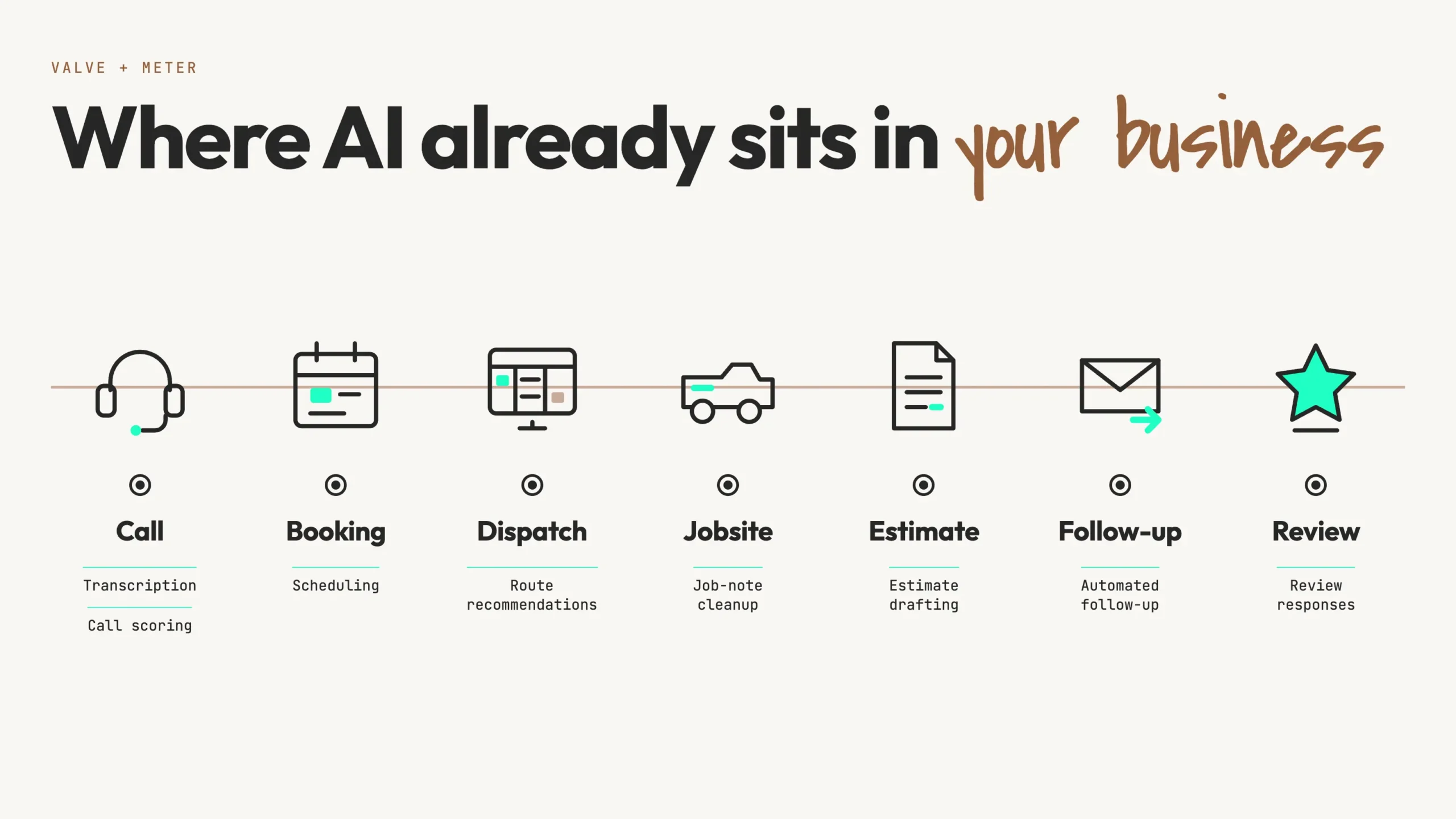
Pay particular attention to included features. Approving a field service platform does not automatically mean the company has evaluated every transcription, scoring, scheduling, or generative feature later introduced within it. A feature may be convenient and still need rules governing its data, output, and ownership.
Name the tools employees may use
Instructions to use AI “safely” leave employees to decide which tools are safe. Your policy should identify approved tools and the work each one may perform.
The approved list should answer practical questions. Can employees use personal AI accounts for company work? Does the company provide managed accounts? Which systems may process customer information? Who can approve a trial? Where should useful prompts and outputs be stored so they do not disappear when an employee leaves?
A small contractor does not need an IT department to manage this. The owner, general manager, office manager, or systems administrator can maintain a simple register:
| Tool | Approved use | Information permitted | Owner |
|---|---|---|---|
| Company AI account | Drafting and internal assistance | Public and approved internal information | Office manager |
| Voice agent | After-hours intake and booking | Information required to handle the call | CSR manager |
| Call-scoring platform | Coaching and quality review | Covered call recordings | Sales manager |
Employees should also have a way to test new tools. A reasonable policy may allow experiments that use public, fictional, or properly anonymized information. Customer records and confidential company information should wait until the tool and use have been approved.
Establish what information AI may receive
The instruction “do not enter sensitive data” is too vague. A CSR, technician, and marketing coordinator may each define sensitive information differently. The policy should use examples drawn from the company.
Information that is generally lower risk
Employees can usually use approved tools with published website copy, manufacturer documentation, blank company forms, public promotions, approved service descriptions, and information that has been stripped of customer or employee identifiers.
Even low-risk information needs a purpose. Uploading an entire folder because one document might be useful gives the tool more access than the task requires.
Information that belongs only in approved systems
Customer names, phone numbers, email addresses, service addresses, equipment history, call recordings, transcripts, estimates, invoices, and photos taken inside a home should be handled only by systems the company has approved for that information.
The same principle applies to employees. Call scores, compensation information, performance records, schedules, and disciplinary notes should not be copied into whichever chatbot happens to be open.
Approval should account for the tool’s terms, account settings, access controls, retention practices, and business purpose. Paying for a business account can provide better controls, but the subscription label alone does not make every upload appropriate.
Information that should stay out of general-purpose AI tools
Passwords, access codes, API keys, payment-card details, banking information, Social Security numbers, driver’s licenses, medical information, background-check records, and confidential legal communications require stricter handling. Most employees have no reason to place them in an AI prompt at all.
A useful test is straightforward: if sending the information to the wrong person would create a serious problem, an employee should not place it in an AI tool unless the company has specifically approved the tool and the use.
Separate assistance from authority
AI is capable of producing a polished answer when its information is incomplete or wrong. Fluency can make an unverified recommendation look settled. A policy needs to define which work AI may prepare and which decisions a person must own.
AI can often draft, summarize, organize, calculate from approved inputs, flag an exception, retrieve source material, or recommend an action. Those uses give an employee a useful starting point without transferring responsibility to the system.
Human approval should ordinarily remain required for:
- Safety instructions and emergency handling
- Final diagnoses and repair recommendations
- Prices outside an approved price book
- Warranty coverage and exceptions
- Financing representations
- Refunds, credits, and disputed charges
- Hiring, firing, discipline, and compensation
- Legal demands and insurance matters
- Commitments involving money, timing, or liability
Consider technician documentation. AI can turn dictated notes into a clear customer summary. The technician must verify that the summary accurately describes the equipment, findings, work performed, and recommended next step. The tool should not decide that a heat exchanger is safe, that a warranty applies, or that the company can complete a replacement by Friday.
Human review also requires more than clicking an approval button. The reviewer needs access to the source information and enough knowledge to recognize an error. The employee who approves the output remains responsible for using it.
Need help? Check Out Our
FREE AI Usage Policy Generator for the Trades
Give customer-facing AI tighter rules
Customer-facing systems can create a problem before a manager knows they were involved. The policy should therefore be more specific about tools that answer, publish, book, quote, or send.
Phone, chat, and intake
An AI receptionist needs an operating playbook. It should know the company’s current services, service area, business hours, fees, promotions, and scheduling rules. That information should come from a source the company maintains, with a named person responsible for updates.
The playbook also needs a clear exit. Define when the system transfers a caller, offers a callback, or reaches an emergency line. Gas odors, smoke, sparking, active flooding, and unsafe indoor temperatures involving vulnerable occupants should bypass an ordinary booking script. Repeated misunderstanding, customer frustration, billing disputes, and requests for a person should also trigger escalation.
The policy should state whether the AI may quote a diagnostic fee, offer an arrival window, apply a promotion, or schedule a particular type of work. If it lacks current, approved information, it should hand the question to an employee instead of completing the missing details itself.
Recording and transcription add another obligation. Consent requirements vary by state and can depend on where the parties are located. Automated and AI-generated outbound calls and texts can also implicate federal and state telemarketing rules. The FCC has confirmed that AI-generated voices fall within the Telephone Consumer Protection Act’s restrictions on artificial or prerecorded voice calls. A contractor using these systems should have counsel review its notices, consent language, vendor practices, and calling workflows before launch. See the FCC ruling on AI-generated voices.
Estimates and customer follow-up
AI can prepare an estimate explanation or follow-up message using approved information. It should not change the scope, price, discount, financing terms, warranty, rebate, or completion date. If messages send automatically, the workflow should stop when the customer declines, opts out, books, or otherwise closes the opportunity.
Any number or promise in the message should come from a controlled source. A model’s best guess about the current tax credit, manufacturer warranty, or financing offer is not an approved company representation.
Reviews and complaints
AI can help draft review responses, particularly when the business receives enough reviews that timely replies become difficult. Automatic publication adds little value compared with the downside of one careless response.
Complaints involving safety, property damage, billing disputes, employee accusations, discrimination, insurance, or legal threats should go to a person. Even a routine negative review deserves a response that reflects what the customer actually wrote and what the company knows about the job.
AI should never create a review, invent a testimonial, or turn a customer’s qualified statement into a stronger endorsement. The FTC’s rule prohibits fake or false reviews and expressly includes reviews attributed to people who do not exist, including AI-generated fake reviews. Google also prohibits reviews that are not based on a genuine experience, incentives tied to reviews, and selective solicitation of positive reviews. See the FTC rule on fake reviews and testimonials and Google’s Maps content policy.
Set rules for AI in the field
Technicians have good reasons to use AI. Dictation can reduce the time spent writing job notes. A tool can organize inspection findings, retrieve approved manufacturer documentation, or turn technical notes into a customer-friendly description of completed work.
The boundary belongs at technical judgment. A general chatbot should not be treated as the final authority for diagnosis, code compliance, parts selection, repair procedure, or an electrical, gas, combustion, refrigerant, structural, or life-safety decision. The qualified person performing or approving the work remains accountable.
Jobsite information needs rules as well. Photos taken in a home may reveal faces, family names, addresses, possessions, security equipment, documents, medical devices, or other personal details. The policy should specify which systems may receive those photos and whether they can be used for training, marketing, estimating, or documentation.
Generated images should never be presented as actual company work. They may have a legitimate place in advertising or design, but prospective customers must not be led to believe a fictional installation, technician, truck, or finished project documents the company’s experience.
Tell employees how AI is used to evaluate them
Call scoring, transcription, and technician coaching affect employees differently from a writing assistant. A policy should explain what the company records or analyzes, who can see the information, how long it is retained, and how the results are used.
If scores affect coaching, compensation, discipline, scheduling, or advancement, managers should review the underlying interaction before acting. AI scoring can identify a call worth listening to. It can misread tone, miss context, apply an unsuitable rubric, or attribute words to the wrong speaker. The score is a lead for a manager, not proof of what happened.
Employees also need a way to question inaccurate transcripts or scores. That process does not need to be elaborate. It needs to identify who will review the original material and correct the record when the system is wrong.
Before implementing recording or employee-monitoring technology, the company should review applicable consent, notice, employment, labor, and privacy requirements in every state where it operates. The policy should reflect the company’s actual practices after that review.
Assign an owner and a way to shut each system down
Every significant AI workflow needs one person accountable for its performance. That person does not need to be an AI specialist. An owner, general manager, CSR manager, service manager, marketing manager, or systems administrator may be the right choice.
The workflow owner maintains its instructions and source information, controls who may change it, reviews representative output, investigates failures, and tracks whether it produces the expected business result. For an AI receptionist, that may include a weekly sample of successful bookings, transfers, abandoned calls, and failed interactions. An internal drafting tool may need much less oversight.
 The owner must also know how to pause the system. If the voice agent begins booking outside the service area on Saturday, someone should be able to turn it off and route calls to a working alternative. The same requirement applies to automated messages, review responses, scheduling connections, and other systems that can continue making the same mistake at scale.
A manual fallback belongs in the operating plan. It does not need to reproduce every automated feature. It needs to keep customers and employees from becoming trapped in a broken workflow.
Define what happens when AI gets something wrong
AI failures should be reported early enough to prevent repetition. Employees are less likely to report them if every mistake is treated as misconduct, so the policy should distinguish an honest error or system failure from knowingly ignoring a rule.
The response can be simple:
- Stop sending, publishing, or relying on the affected output.
- Pause the workflow if it may continue affecting customers or employees.
- Preserve the prompt, response, call, message, or screenshot.
- Notify the workflow owner.
- Correct the customer communication or business record when necessary.
- Determine whether confidential or protected information was exposed.
- Fix the source information, instructions, permissions, or process before restarting.
The correction matters as much as the immediate cleanup. If a voice agent quoted an outdated diagnostic fee, fixing one customer’s bill leaves the underlying problem in place. The company must update the source and confirm that the system now uses it correctly.
Serious incidents involving personal information, payment data, threats, safety, discrimination, employment actions, or legal claims should follow the company’s existing escalation process and receive appropriate professional review.
Write a policy employees can use during the workday
A policy filled with principles but no operating examples will be signed and forgotten. Use the names of real tools, recognizable situations, and actual job roles. State who gives approval and how an employee reaches that person.
The policy should answer questions such as:
- Can a CSR place a customer complaint in the company AI account?
- May a technician upload a nameplate photo?
- Can the voice agent quote the dispatch fee?
- Who reviews a one-star response before it publishes?
- Can call scores affect bonuses?
- What should an employee do after sharing information with the wrong tool?
Introduce the policy in a working session with office and field employees. Use a few situations from the company’s own workflow and have the team apply the rules. This is more useful than emailing the document and collecting signatures without discussion.
Review the approved-tool list whenever the company adds a significant system or enables a new customer-facing feature. Review the full policy after an incident and on a regular schedule, at least annually. Fast-changing workflows may justify a quarterly check of the tool and workflow registers even when the policy language has not changed.
An AI usage policy is one part of operating the system. Customer-facing automation still needs testing, performance measurement, routine quality review, maintained source information, and a person accountable for the result.
Build an AI usage policy for your home service company
The policy needs to reflect your tools, customer interactions, employee practices, and tolerance for automation. A generic download cannot decide whether your voice agent may quote a diagnostic fee, which customer data your systems may process, or how your managers use call scores.
Our guided policy builder asks about the AI tools already in your business, what information they access, what work they perform, and what decisions they are allowed to make. It then creates a customized starting policy for your company.
This article provides general business information and is not legal advice. Laws governing privacy, recording, employment, advertising, calls, texts, and consumer protection vary by jurisdiction and use. Have qualified counsel review the provisions that apply to your company.