





For any website owner, the clear and present challenge is creating relevant content that draws in your audience.
Amidst striving for better Google search rankings or updating your site for a product launch, it’s easy to overlook the maintenance of your website’s infrastructure.
Now imagine yourself as a visitor navigating your website keen to explore more or perhaps make a purchase. You click an internal link, only to suddenly slam into a “404 Error” page.
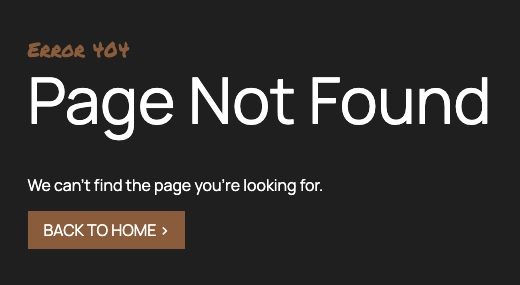
Encountering broken links is akin to running into a dead end. As a website evolves, broken internal links can become a common issue. However, savvy SEO professionals and web developers can effectively manage and fix these obstacles.
External links, on the other hand, present a trickier challenge, with errors being harder to prevent and often inevitable.
Broken links are more than just a minor inconvenience; they can actively harm your website’s reputation with visitors and even derail your SEO endeavors.
At Valve+Meter Performance Marketing, we provide SEO agency services to numerous website owners and businesses. Our seasoned SEO experts have established methodologies to identify and resolve broken links.
In this guide, we’ll uncover how broken links sabotage your website, hurt your search rankings, and frustrate your visitors.
If you want step-by-step instructions to find every digital pothole and the tools to fix them, then you may prefer this more in-depth blog from SemRush. Our aim is to provide business owners, marketing leaders, and other website owners a better understanding of broken links, how to avoid them, and the available tools and techniques to fix issues.
What Is a Broken Link?
A broken link is a hyperlink on a website that leads to an error page instead of the intended content. These website errors are also known as a dead link or a 404 error.
There are two main of broken links:
- External Broken Links: These point to another website or pages outside of your control that have been deleted or changed.
- Internal Broken Links: These are links within your own website leading to pages that no longer exist, have moved, or never existed.
Broken links are so common that Google’s John Mueller says it’s normal if 30-40% of a website’s Search Console report to return 404 errors.
Less common types of dead links include a variations of internal and external links:
- Broken Anchor Links: These links aim to take the user to a specific part of a page (using an anchor tag) but fail because the anchor no longer exists.
- Broken Image Links: These occur when the source file for an image on a webpage is missing or incorrect, resulting in a broken image icon.
- Broken Video Links: Just like a broken image link but a video file is missing or removed from the hosting platform.
- Broken Download Links: These create a poor user experience especially for downloadable content like e-books, catalogs, and forms. These links are supposed to initiate a file download but fail because the file is no longer available.
- Broken Email Links: These occur when email links (mail to: links) are formatted incorrectly or the email address is no longer valid.
- Broken Social Media Links: These are links to social media profiles or pages that no longer exist or have been deactivated. Sales decided to shut down Twitter and no one bothered to team the web development and SEO team.
There are many versions of broken links, but fortunately, the reason links become broken in the first place are pretty similar.
Poor Experience 42%
42% of users will leave your site due to poor performance including dead links.
Why Do Broken Links Happen?
That last example of a seemingly unrelated decision creating a ripple effect that ends in a dead link is the primary culprit.
Broken links occur due to typos, deleted pages, website renovations, outdated content, or changes to external websites.
Broken links are as common as potholes on a street. Without maintenance and care, a street becomes riddled with cracks and potholes. In the digital world, this phenomenon is known as link rot.
Let’s run through examples for each of these reasons:
Typos
Back to our roadway analogy, if the address is wrong you cannot reach your destination.
One wrong character in a URL creates a dead end.
If web designs, developers, and content creators insert a link but type the wrong address an error is created.
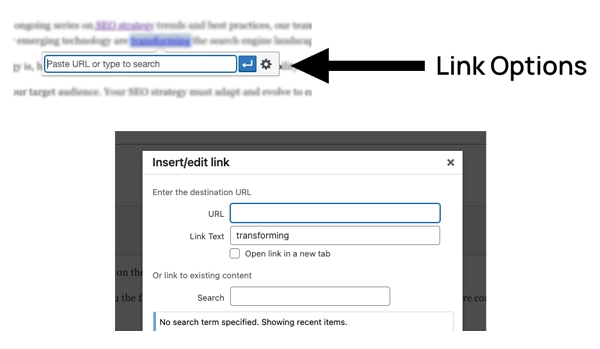
- Best practice: To avoid manual errors, SEO professionals use “Link Options” tools like the one illustrated below from WordPress. These tools allow you to search the internal page and establish an accurate link.
###
Deleted Pages
If a page is deleted, the result is a dead link.
The same is true for images, videos, and downloadable files.
A common example is when an employee leaves a business and their bio is deleted. This makes sense, but without a redirect, every link to that URL on your website and external websites is now broken.
For contractors, a common mistake is deleting old service pages. If a plumber moves from gas line repair to only drain cleaning, and removes the gas line page without redirecting, they lose the link equity from any inbound links to that page.
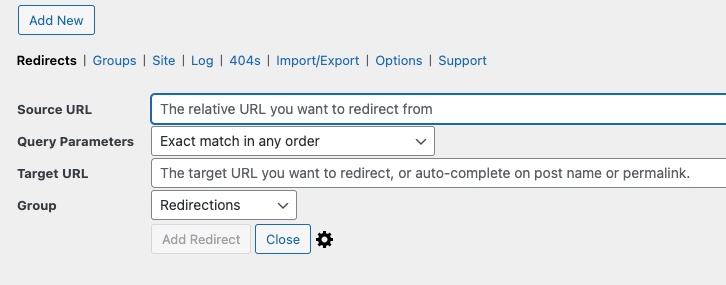
- Best Practice: Each time a page is removed, a 301 redirect can be created. The image below is the redirection tool within WordPress. If there is not a direct replacement page, then you can create a redirect for the parent page.
For example: www.website.com/our-team/employee-name would be redirected to www.website.com/our-team/
Website Renovations
As websites evolve, redesign and changes in URL structure occur. A well managed website uses redirects to help search engines and users understand website renovations.
Bypassing redirects is like a city removing all the street signs.
For example: www.website.com/our-team/ might be moved to www.website.com/about/our-team/
- Best practice: SEO professionals create and maintain a complete sitemap. During website renovations, tools like Slickplan help manage website renovations.
Outdated Content
Old links may point to pages that no longer exist.
This is a frequent occurrence for e-commerce product pages and businesses that expand their services.
Similar to website renovations, running redirects can help prevent numerous dead ends on your website, ensuring a smoother navigation experience for your visitors.
- Best Practice: Monitoring your website using tools like Ahrefs, Semrush, and Moz help warn your team when broken links occur.
External Websites
The same factors that cause internal links to break can also affect external links.
When you link to other websites, those pages might be relocated to new URLs or removed altogether.
Additionally, changes in domain names or the complete removal of sites can lead to dead links, creating navigation issues for your visitors.
- Best Practice: Like broken internal links, web professionals use applications to find and fix broken links regularly. It is also recommended to choose external links wisely. Broken external links are less likely to occur by vetting the websites initially.
Clearly, broken links are an inevitable part of the internet landscape. However, with proactive monitoring, strategic redirects, and a commitment to content freshness, you can keep your website’s roads smooth and free of digital potholes.
Scope Of Lost Links 3/4
74.5% of links to over 2 million websites are considered lost.
Broken Links 49%
49% of links cited by the U.S. Supreme Court lead to dead sites or broken links.
Why Are Broken Links Bad for Your Website?
Broken links hurt your website’s SEO and most importantly, leave visitors frustrated.
The prevalence is alarming. A study by Ahrefs found 74.5% of links to over 2 million websites are considered lost. The problem with dead links caught wide public attention more than a decade ago when 49% of links cited by the U.S. Supreme Court lead to dead sites or broken links.
What are the implications of dead links on your website?
- User Frustration: Imagine each broken link as a literal roadblock forcing visitors to turn around. When a website functions poorly, 42% of users will leave your site.
- Lost Credibility And Trust: A site riddled with errors signals neglect. Why would a visitor stay engaged if you don’t seem to care about the basics? With a billion other websites available, they may question your reputation and move on.
- Missed Conversions: Links on your website exist to make navigation easier and to guide visitors toward an ideal outcome. Broken links pointing nowhere do the opposite. Every frustrated visitor is a potential customer who didn’t reach your product pages, services, or contact form.
- Google Search Results: While users may not access your entire website, search engines do. Broken links lead to crawl errors. Too many broken links on a page or your website can impact how Google indexes your website. A poorly maintained website signals to Google that your content may be outdated or unreliable. Broken internal links are just one factor that can damage your organic rankings.
In an era where 96.55% of website content receives little or no traffic, website owners need to understand how and why to optimize for visibility in Google and other search engines.
How Broken External And Internal Links Impact SEO
Search engine optimization (SEO) focuses on website structure and function. Before a web page appears in Google search results, crawlers index the content.
SEO experts carefully consider the ideal URL, headings, and content for each new page they create. Links within your website also play a strategic role.
Internal links show the relationships between pages on your site. For example, a page about red apples might link to one about green apples.
External links connect your content to related sites, reinforcing relevance. For example, your page about red apples could link to a site about their health benefits.
Broken links directly and indirectly harm your SEO efforts.
Direct Impact
- No Indexing: If a page has a broken link, crawl errors may prevent the page from being indexed.
- Poor User Signals: Search engines track how people interact with your website. High bounce rates and short dwell times, which often accompany broken links, signal that your content isn’t satisfying search intent.
Indirect Impact
- “Link Equity” Dilution: Think of links like votes of confidence. Broken backlinks occur when you don’t add a redirect when a page moves. You waste the opportunity to build credibility and credibility because of these broken elements.
- Wasted Crawl Budget: Search engines allocate a certain amount of time and resources to “crawling” your site. If crawlers constantly hit dead ends due to broken links, they may not uncover your most valuable content.
- “Trust” Factor: While Google has not confirmed trust as an official ranking element, many SEO experts believe sites exhibiting neglect, like having lots of broken links, are less likely to be perceived as authoritative by algorithms.
Nearly all websites will be affected by broken links at some point. The key is to maintain and fix broken links on a regular schedule.
One or two broken links are unlikely to have a major impact, but a site riddled with them sends strong negative signals.
Context is incredibly important. Broken links on important pages like your homepage and primary product or service pages are more harmful than a single broken link in an old blog post.
How To Avoid Broken Links
There are a few best practices that every website owner should know to prevent a dead link from hindering SEO and user experiences.
Proactive link maintenance includes regularly checking for broken links using tools like Google Search Console and SEO auditing features.
301 Redirects: Your Best Tool
If you change a page’s URL, delete a page but have a suitable replacement, or fix typos. This way, anyone clicking the old link lands in the right place. Other times to use redirects include:
Updating Content to Fix Links
- Valuable Pages: Before deleting anything, consider if updates (fixing outdated info, etc.) could make the page worth keeping. This preserves any backlinks it has.
- External Links: Sites change. Periodically check your external links. Replace truly dead ones, and update any that have moved to new URLs.
Strategic Linking: The Prevention Mindset
- Internal Links: When creating them, double-check URLs for accuracy. Use link management tools if your CMS offers them.
- External Links: Choose reputable sites with relevant content to minimize future breakage.
Fixing broken links isn’t just about patching up errors, it improves the health of your website and user engagement.
How To Find Broken Links on Your Website
There are a number of tools to check your website for broken links that lead to the dreaded error message.
A professional SEO audit is a thorough assessment of your website. This process reveals any issues hindering your website’s search ranking potential.
Broken links (both internal and external) are included in a audit. Other common issues looked for include missing meta tags, duplicate content, and incorrect heading usage.
A audit helps to research, plan, and build an SEO strategy.
For internal teams and individual website owners, a number of tools are available.
- Google Search Console: This free tool helps monitor website performance in Google Search. For fixing broken links, Google Search Console shows errors directly from Google’s perspective.
- Screaming Frog: This desktop software crawls your site to find broken links. Screaming Frog generates a detailed report on technical SEO issues.
- Ahrefs, Moz, Semrush: For complex websites and ongoing projects, there are powerful platforms that include broken link checkers. There are a range of features including free and paid options.
When to Work With An SEO Agency
If you need broken links fixed fast or want ongoing monitoring, an SEO team is invaluable.
Valve+Meter builds customized digital marketing strategies and executes complete services.
SEO professionals know the tools inside and out and can swiftly address any issues found. This frees you up to focus on your core business while ensuring your website maintains its search rankings over time.