




For a home services company, AI earns its place in one of three ways: it recovers revenue that would otherwise be lost, increases the number of trucks the existing office can support, or improves decisions that affect booking rate, close rate, average ticket, and margin. Saving a few minutes on an email is convenient, but it will not materially change the business.
The market is crowded with voice agents, call-scoring platforms, scheduling tools, reporting products, and AI features bundled into software contractors already use. Some can produce measurable returns. Others automate work that was never expensive enough to justify another subscription.
The biggest opportunity isn’t in the technician’s hands. Repairing and replacing equipment still requires trained people in trucks. AI can change how much office labor, coordination, and management support the company needs as it grows. That has direct implications for operating margin and business value.
Start with the economics of your business
Most AI products for contractors promise some combination of faster call response, easier scheduling, better follow-up, automated review management, lower administrative workload, and more consistent sales performance. Those are reasonable claims, but their value depends on the problem inside your company.
A voice agent has little value if your CSRs already answer nearly every call and book at a high rate. It may be extremely valuable if nights, weekends, and seasonal call spikes regularly send customers to voicemail. Automated reporting matters when employees spend days assembling numbers from several systems. It matters much less when the owner rarely uses the reports to make a decision.
Software vendors naturally present their own product as the answer. Evaluate it using your call volume, labor costs, booking rates, office headcount, and growth plan. A vendor’s estimate of hours saved cannot tell you whether those hours will reduce payroll, delay a hire, recover revenue, or simply disappear into the workweek.
Why AI matters to the private-equity model
HVAC, plumbing, and electrical companies appeal to investors because the demand is local and much of it cannot be postponed. A failed furnace, leaking water heater, or unsafe electrical panel still requires a trained technician to visit the property. The work cannot be moved overseas or replaced by software.
The challenge is that growth has traditionally required overhead to grow with it. More trucks require more technicians, but they also tend to require more CSRs, dispatchers, managers, reporting work, software seats, and administrative support. Revenue increases while much of the cost structure follows behind it.
AI may loosen that relationship. If a company can add trucks without adding office employees at the same rate, each new truck contributes more operating profit. A company that can support 40 trucks with seven office employees has a different cost structure from one that requires twelve, even if both produce the same field revenue.
That operating leverage matters to any contractor planning to grow. It matters even more to an acquirer that expects to apply the same model across several companies. Better systems at the platform level can improve the economics of every additional location and acquisition.
How AI changes the cost of adding a truck
A residential service company generally carries three broad categories of expense:
- Direct labor and materials, including technicians, parts, and fuel
- Overhead labor, including CSRs, dispatchers, office employees, and management
- Other operating costs, including software, marketing, facilities, trucks, and insurance
Consider a 20-truck company with four to six employees handling phones, dispatch, marketing coordination, and office management. Its annual overhead payroll might be approximately $450,000 before benefits. Under a traditional staffing model, growing to 40 trucks could push that payroll toward $900,000.
Now consider the same 40-truck company using AI for after-hours and overflow calls, estimate follow-up, review-response drafts, technician briefings, and recurring reports. Through growth and normal employee turnover, it reaches 40 trucks with seven office employees instead of twelve. Annual overhead payroll reaches $600,000 instead of $900,000.
The difference is $300,000 in avoided annual payroll before accounting for software and implementation costs. Revenue is the same in both 40-truck scenarios. The difference flows into operating profit.
This is why “hours saved” is an inadequate measure of return. Time savings create financial value only when they produce an observable result: a position is not added, more calls are booked, estimates close at a higher rate, technicians complete more work, or managers make faster and better decisions.
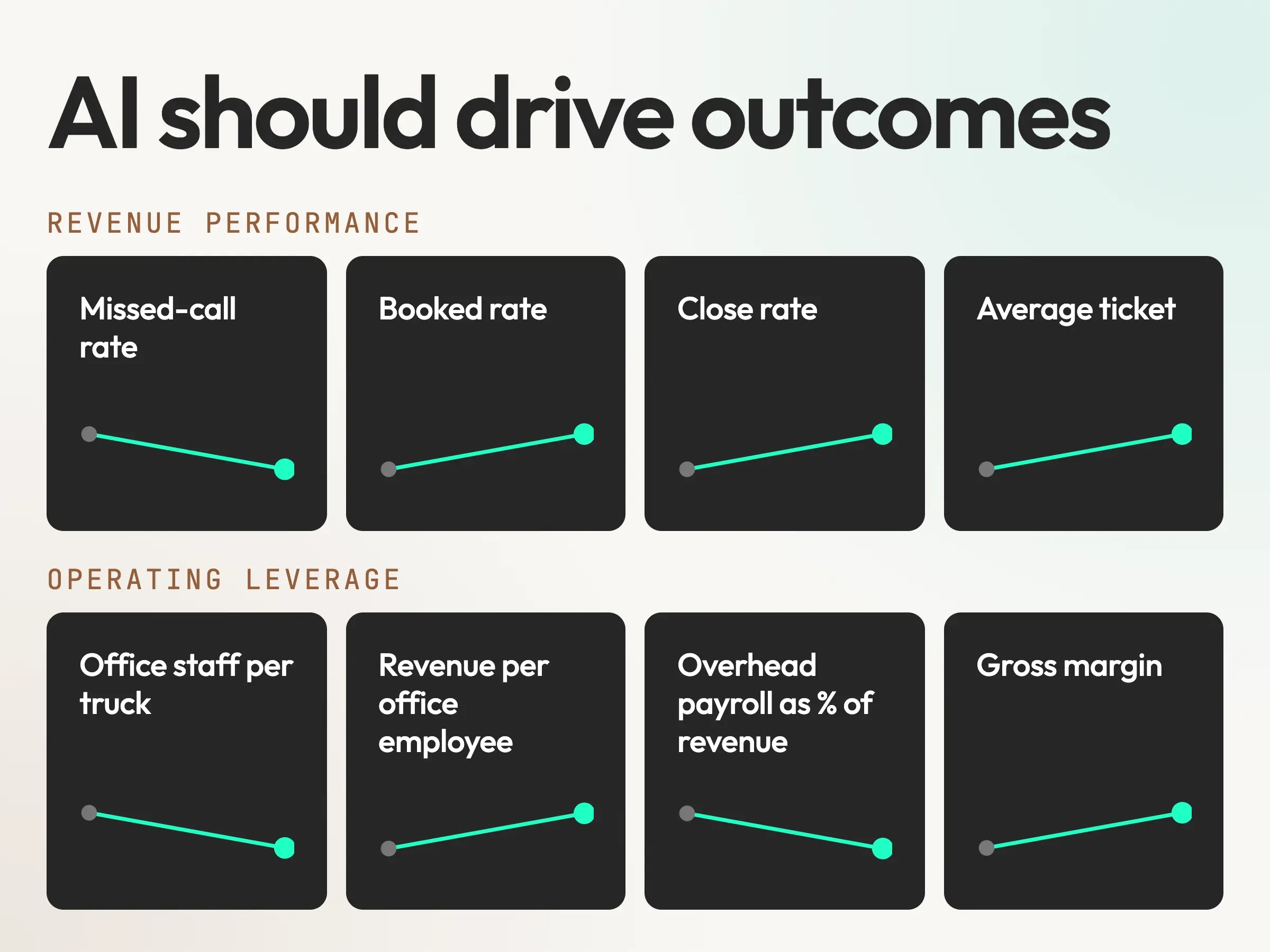
Track overhead payroll as a percentage of revenue, office employees per truck, inbound booking rate, close rate, average ticket, and operating margin. Each AI investment should have a specific metric attached to it before implementation. If the metric does not improve within a reasonable test period, fix the workflow or stop paying for the tool.
Field labor requirements don’t disappear. A growing service company still needs technicians. The economic opportunity is to let each office employee support more field revenue without damaging the customer experience.
Three kinds of AI
Every vendor calls their thing “AI,” which makes it hard to compare anything. There are three different things going on, and they have different economics.
Layer 1 – Bundled AI: Features that came with software you already pay for. ServiceTitan, Housecall Pro, Jobber, FieldEdge, and the rest all have AI toggles now: call summaries, suggested responses, smart scheduling, marketing copy. They’re free or nearly free, they’re usually decent, and nearly every company we work with has some of them switched on. Turning them on is a checkbox. It’s also where most contractors stop and call themselves “using AI.”
Layer 2 – Bolt-On AI: Point products that do one job and bill you for it. Voice agents like Avoca or Broccoli. Call recording and sales coaching like Rilla or Siro. Chat and text agents. Review response tools. These are where the real capability lives right now, and also where the per-seat and per-truck pricing lives. A $7-per-truck-per-month line item is easy to approve and impossible to notice until you have 60 trucks and 14 of these.
Layer 3 – AI You Direct or Build: This is the layer that didn’t exist for a contractor two years ago. An operator with no engineering staff can now stand up a reporting dashboard, an inventory tracker, a purchasing workflow, or a custom call-scoring rubric using ChatGPT, Claude, and a low-code tool, in an afternoon. It’s not polished. It doesn’t have a support line. But it costs nothing per truck and does exactly what you told it to.
Vendors can’t draw this line because it exposes Layer 1 as table stakes and Layer 3 as a threat to Layer 2’s pricing model. You can draw it. When you evaluate anything, ask which layer it’s in. Then ask whether the layer above or below it does the job cheaper.
Five levels of AI maturity
We use a five-level scale to place companies. Most contractors who tell us they’re “doing a lot with AI” land at Level 1.
- Level 0 – Ad Hoc: One person uses ChatGPT for emails or proposals. Nobody else knows or cares. Nothing is measured, so nothing returns.
- Level 1 – Assisted: The AI features inside your field service software are turned on. Call summaries show up in the CRM. Marketing copy gets a first draft. No process changed and no one owns the result. It feels like progress, and the gains are real but small. You’ll never see them on a P&L.
- Level 2 – Automated: Specific workflows are handed to AI end to end. After-hours calls go to a voice agent that books to the calendar. Review requests go out on job completion. Every one of these has a named owner, a service level (calls answered within so many rings, reviews responded to within 24 hours), and someone checking a sample of the output every week. This is where the first real return shows up, and it shows up in booking rate first.
- Level 3 – Augmented: AI is in the judgment loop. Every call gets scored. Techs get a briefing before each job with history, equipment, and what the customer said on the phone. Pricing gets checked against what closed and what didn’t. Reporting builds itself. Humans still make the decision, but they’re making it with information they didn’t have before. Returns compound here, and they show up in close rate and average ticket.
- Level 4 – Structural: AI is an input to how the company is designed. When you plan the next 10 trucks, the office headcount plan looks different than it did three years ago. Roles have changed. The cost model has changed. This is the level the private-equity math is built on.
To place yourself, answer three questions. Can you name the person who owns your AI phone answering? Do you know your rollback rate, meaning what you turned on and later turned off? Is there a written policy on what AI is allowed to do without a human signing off? If the answers are no, no, and no, you’re at Level 1 regardless of how many features are on.
| Level | What changed | Where the return appears |
|---|---|---|
| 0 | Individual use | Nowhere measurable |
| 1 | Features turned on | Small task gains |
| 2 | Workflow automated | Booking rate |
| 3 | Judgment augmented | Close rate and ticket |
| 4 | Company redesigned | Overhead and margin |
The pattern we see most often is a $30M platform that has a Level 3 budget and Level 1 operations. They’re paying for four bolt-on tools nobody owns, and the CSR manager is quietly working around three of them.
AI by business function
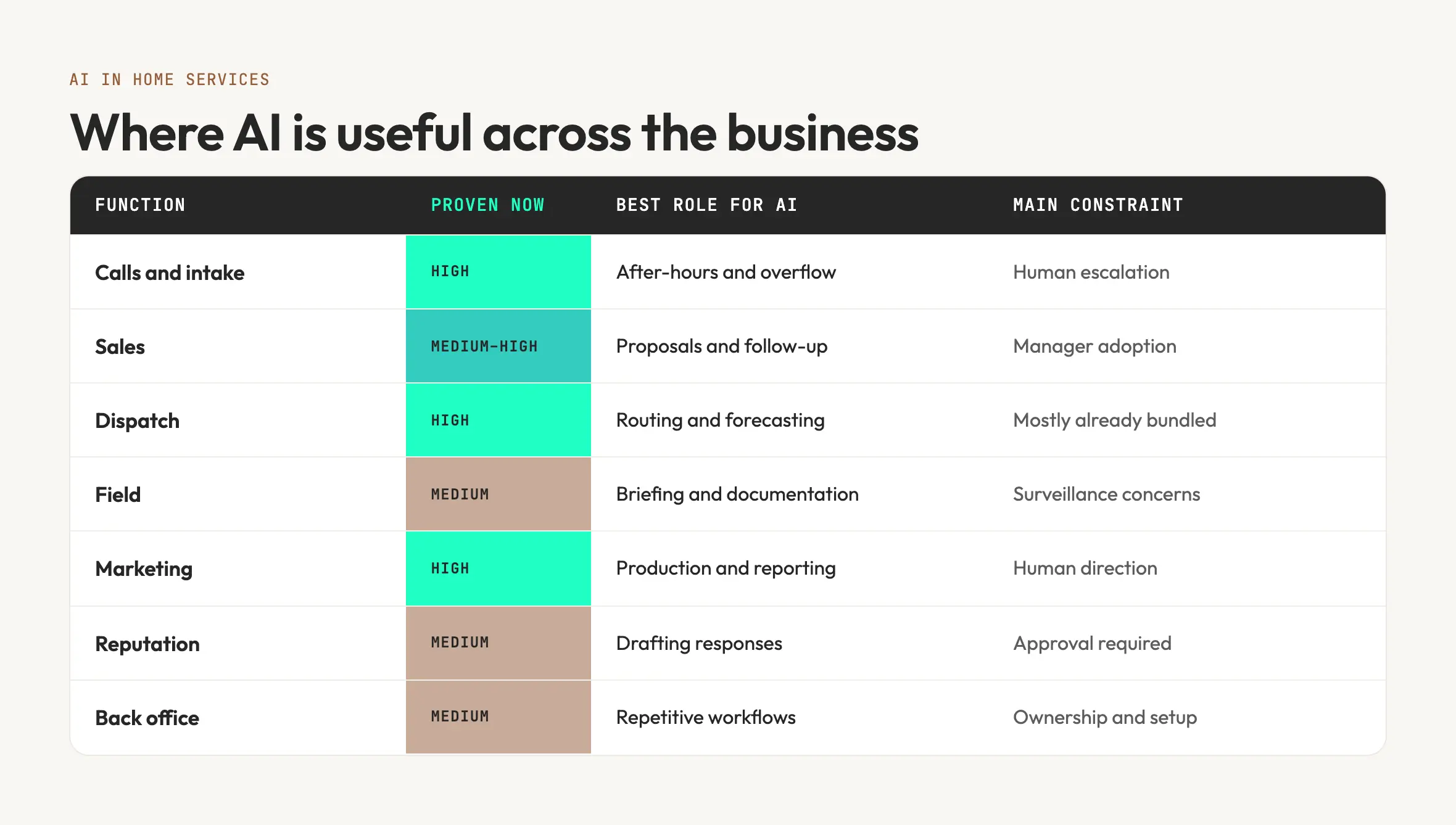
AI is most useful in home services when it recovers missed opportunities, removes repetitive administrative work, or helps managers make better decisions from operating data. Its value varies considerably by function. Call handling and documentation already have clear use cases. Forecasting and coaching depend more heavily on data quality, employee adoption, and management follow-through.
AI for Call answering, intake, and speed-to-lead
Missed calls are one of the largest and most measurable sources of lost revenue in a service business. An HVAC company that receives 300 calls a week and misses 12% of them loses contact with 36 potential customers. If one-third would have booked at a $600 average ticket, those missed calls represent $7,200 in potential weekly revenue.
Voice agents can answer calls, collect information, qualify leads, and book appointments directly to the schedule. Chat and text agents perform similar work on the website. Their value depends heavily on how they handle exceptions. An effective system transfers the caller when someone is upset, the job falls outside the service area, or the situation may be dangerous. A poorly designed system traps the customer in a conversation it cannot complete.
Before evaluating vendors, define what counts as a qualified lead and what should happen when the system cannot handle a call. Pay particular attention to the transfer experience. A capable demo means little if a confused or distressed customer cannot reach a person quickly.
AI for sales and estimating
AI is most useful in the administrative work surrounding a sale. It can draft proposals from technician notes, assemble good-better-best options from the price book, and follow up consistently on open estimates. These applications reduce preparation time and keep viable opportunities from going stale.
In-home sales coaching has a narrower but legitimate use. Conversation recording, scoring, and coaching can help in trades with longer, considered-purchase sales, including roofing, remodeling, solar, and HVAC replacement. It works best when representatives conduct similar appointments frequently, and a manager reviews the findings and provides coaching. It does not replace ride-alongs or direct observation. For technicians running routine plumbing or repair calls, the additional scoring may create more noise than value.
AI for dispatch and capacity
Dispatch optimization is already included in many field-service platforms. It can reduce drive time, tighten appointment windows, and improve the match between technicians and jobs. Once configured, however, its contribution is usually incremental.
Demand forecasting may offer a larger opportunity. Weather forecasts, installation backlogs, historical call volume, maintenance agreements, and staffing availability can help an operator anticipate capacity needs days or weeks ahead. That is more useful than waiting for the schedule to break during the first heat wave of July.
AI for diagnostics, documentation, and field coaching
Technician-facing AI generally supports three tasks. Pre-job briefings assemble customer history, previous invoices, equipment details, and known issues before the technician arrives. Documentation tools convert photos and voice notes into invoices, customer summaries, and follow-up instructions. Coaching tools record and evaluate portions of the service or sales conversation.
Briefing and documentation tools are usually easier to adopt because they remove work from the technician’s day. Coaching tools face more resistance because technicians may experience them as surveillance. Successful deployment therefore depends on clear policies governing what is recorded, who can access it, how scores are used, and whether the system is intended for development or discipline.
AI for marketing and demand generation
AI has reduced the time required to produce first drafts of content, ad variations, Google Business Profile posts, and performance reports. Production is cheaper and faster, but the output still requires someone to supply direction, verify facts, protect the brand, and decide what deserves to be published.
Reporting has changed more substantially. One of our multi-location clients previously relied on a full-time analyst to assemble monthly performance data across locations, channels, and campaigns. That work now runs through an automatically refreshed dashboard, and we did not replace the analyst position.
At Valve+Meter, we use AI to speed up marketing execution and make analysis more thorough. The value we provide still comes from understanding the market, building the strategy, connecting marketing performance to booked jobs and revenue, and holding the program accountable for results. AI gives our team more capacity to do that work. It does not replace it.
AI does not determine positioning, improve an uncompetitive offer, or make the company answer its phone. It can reduce the cost of operating the marketing program and help the team work through more data. AI search visibility belongs within that program, but it is not the focus of this guide.
AI for reputation management
Automated review requests are useful, but most are workflow automation rather than AI. Trigger them after eligible jobs, monitor delivery failures, and support them with a clear process for handling unhappy customers without review gating.
AI is more directly useful for drafting review responses, especially when volume makes consistent replies difficult. A human should review responses before publication, particularly for complaints, safety issues, employee accusations, billing disputes, and anything that may create legal exposure. Do not justify this work with an unsupported claim that a specific response rate improves Map Pack rankings. The stronger case is operational: timely, specific responses show prospective customers that the company pays attention and takes complaints seriously.
AI for your back office
Accounts payable, purchasing, inventory management, payroll preparation, and weekly financial reporting receive less attention than customer-facing applications, but they contain many repetitive workflows that can be automated.
They also produce considerable shelfware. One operator discovered an accounts-payable automation feature inside a platform that had cost the company $10,000 per year. No one had implemented it because the team did not know it was included.
Back-office work is also a strong candidate for narrowly scoped internal tools. The workflows tend to be repetitive, rules-based, and specific to the company. Before building anything, confirm that the existing accounting, payroll, or field-service platform cannot already perform the work.
The work AI shouldn’t do
The technician’s job is safe, and the reason has nothing to do with sentiment. A furnace repair happens in a basement, at a specific address, with a specific unit that’s been modified twice by previous owners, one of whom used the wrong gauge wire. The job requires hands, a truck full of parts, a license, and the judgment to notice the thing that wasn’t on the work order. No amount of intelligence in a data center changes any of that. AI can tell the tech what the last three visits found. It can’t hold the flashlight.
The same is true, more quietly, for the roles that require trust in a moment of stress. A homeowner with two inches of water in the basement wants a person. They’ll tolerate a machine for the first 20 seconds if it gets them to a person fast. They won’t tolerate a machine that loops.
And there’s a third category most people skip: the judgment calls that carry money. Approving a warranty exception, deciding whether to eat a callback, quoting a job that’s off the price book. AI can prepare the decision. It shouldn’t make it, because when it’s wrong there’s no one to hold accountable and no way to know why.
In the companies doing this well, the line sits in the same place. AI owns the first draft, the after-hours, the overflow, the repetitive, and the reporting. Humans own the truck, the escalation, and anything with budget authority. Write that line down as policy, because preference drifts and policy gets audited.
What happens to office headcount
AI is unlikely to eliminate the office staff at a growing home services company. Its more immediate effect is to slow the rate at which office headcount grows as the company adds technicians and trucks.
Field staffing will continue to follow demand. More completed jobs still require more technicians, installers, and field supervisors. The change is in how much revenue each office employee can support.
For CSRs, after-hours answering, overflow coverage, outbound follow-up, and routine scheduling can reduce the need to add employees as call volume grows. A company moving from 25 to 35 trucks may be able to handle the additional volume without the two CSR hires it once would have planned. The calls that remain with the CSRs are more likely to involve upset customers, unusual requests, scheduling conflicts, and other situations that require judgment. The role becomes more demanding even if the team does not become larger.
Marketing roles also become less production-oriented. AI can prepare first drafts of emails, social posts, advertisements, reports, and other recurring materials. The marketing employee spends more time setting priorities, supplying source material, reviewing output, coordinating campaigns, and measuring performance. Companies may need fewer hours of production labor, but the person responsible for the work needs stronger editorial and analytical skills.
Dispatchers remain important because schedules change throughout the day and many decisions depend on information the software does not fully understand. AI can help with routing, technician matching, drive-time estimates, and schedule recommendations. The dispatcher still handles exceptions and decides when customer needs, technician capability, or business priorities should override the recommendation.
Reporting and analysis may see the largest reduction in manual labor. Work that consists primarily of exporting data, reconciling formats, updating spreadsheets, and distributing recurring reports can often be automated. The analytical work that remains is more valuable: finding the cause of a performance change, deciding what deserves attention, and recommending what the company should do next.
The practical headcount goal is fewer office employees per truck without reducing booking rates, customer satisfaction, schedule quality, or management control. Companies should measure that ratio alongside overhead payroll as a percentage of revenue. If office employment continues to rise at the same rate as truck count, the AI investment has not changed the company’s cost structure.
Who should own AI
Every AI workflow needs one person who is accountable for its performance. That person does not need to be an engineer or an AI specialist. They need enough authority and operating knowledge to set the rules, review the output, resolve failures, and decide whether the workflow should continue.
The appropriate owner usually depends on the size and complexity of the company.
At companies under approximately $5 million in annual revenue, ownership will often remain with the owner or general manager. The scope should be narrow enough to manage directly. One or two Level 2 workflows, each tied to a measurable result and reviewed weekly, are more realistic than a broad collection of tools.
Between approximately $5 million and $20 million, responsibility often belongs to an operations manager, office manager, or systems administrator. Assigning responsibility is insufficient if none of that person’s existing work is removed. The owner needs time to review performance, maintain instructions, coordinate with vendors, and correct problems. Each workflow should have one primary metric reported through the company’s normal operating meetings.
Larger and multi-location companies may justify a dedicated systems or process-improvement role. This person sits between operations, finance, marketing, and the field. Their job is to manage the company’s systems as operating assets, including implementation, documentation, quality control, vendor performance, and replacement decisions.
Regardless of company size, three elements should be documented.
An audit schedule. Customer-facing workflows should be sampled frequently enough to catch problems before they become patterns. For a voice agent, that might mean reviewing five calls every week, including successful bookings, transfers, abandoned calls, and failed interactions. Internal workflows can usually be reviewed monthly. The schedule should identify who performs the review and what happens when the output fails.
A prompt and playbook library. Store the instructions, call scripts, escalation rules, approved claims, templates, source documents, and workflow settings in a location the company controls. Include version history and identify the person responsible for updates. The system should remain understandable and maintainable if the employee or vendor who configured it is no longer available.
A written AI use policy. Your business should have an AI usage policy. The policy should define which systems and data AI may access, which actions require human approval, who may change a workflow, how customer disclosures are handled, and what the system is prohibited from quoting, promising, or deciding. The policy can be brief, but it should be specific enough to guide an employee or vendor without requiring interpretation.
Eleven ways AI deployments go wrong
We’ve seen every item on this list happen to a contractor or watch one narrowly avoid it.
- Moving every call to AI. A multi-location operator moved all inbound calls to a voice agent, day and night, and pulled the CSR bench down to match. Booking rate on after-hours calls went up. Booking rate on daytime calls went down, callbacks went up, and the Google reviews started mentioning the phone. Within a quarter, they’d put humans back on daytime and kept the agent for overflow and nights. The right split turned out to be roughly 30% machine and 70% human, and they’d guessed 100%.
- Callers who can’t reach a person. A customer who cannot reach a human never gets resolved. They don’t call back. They post the transcript. Every voice or chat agent needs a hard rule: after two failed attempts to understand, or on any expression of frustration, transfer to a person or take a callback with a promised time.
- Booking outside the service area. The agent takes an address, doesn’t check it against the territory, and a truck gets dispatched 50 miles the wrong way. Fix: the agent validates the address before it books, and “we don’t serve that area” is a scripted outcome with a referral, not an error.
- Quoting a service you no longer offer. The knowledge base said you do duct cleaning. You stopped doing duct cleaning in 2024. The agent quoted it. Now you either honor it or explain. Fix: the service list the agent reads from is the same list that drives your price book, and someone owns keeping it current.
- Missing an emergency. Caller says “I smell gas.” Agent says, “I can book you for Thursday.” This is the one that gets you sued. Every intake agent needs a keyword and sentiment trigger list (gas, smoke, sparking, flooding, no heat with an infant, no AC with an elderly resident) that skips the script and goes straight to a human or an emergency line.
- Recording without consent. Roughly a dozen states, including California, Florida, Illinois, Pennsylvania, and Washington, require all parties on a call to consent to recording. AI call scoring, AI transcription, and AI coaching all depend on recording. If you operate in or call into one of those states, you must disclose this up front. This is easy to do and easy to forget, and the penalty is per call.
- Automated outbound calls and texts. The Telephone Consumer Protection Act governs automated calls and texts. In 2024, the FCC made clear that AI-generated voices count as artificial under the law, which means an AI calling a homeowner about a maintenance renewal needs the same prior express consent as a robocall. Texts are covered too. Add consent language to your service agreements and web forms before you turn on outbound.
- Breaking review rules. The FTC’s 2024 rule on fake reviews, plus Google’s own policies, mean you can’t gate reviews (only ask happy customers), buy them, or suppress the bad ones. An AI that “optimizes” your review flow can quietly do all three. Read what the tool actually does before you turn it on.
- Auto-responses that make a bad review worse. A one-star review about a tech tracking mud through the house gets a cheerful auto-response thanking them for their feedback and inviting them to call. The reviewer edits their review to include a screenshot. Every review response gets a human read before it posts, and the AI’s job is to save that human ten minutes, not to replace them.
- Made-up prices, terms, and dates. Models make things up. Usually it’s harmless. When the thing it makes up is a price, a warranty term, a financing rate, or a completion date, it’s a commitment you didn’t authorize. Any AI that touches money or promises should either read from a source of truth you control or hand off to a person.
- Brand voice drift. Six months in, your emails, review responses, and social posts all sound like the same slightly-too-cheerful assistant. Customers can’t say what changed but they notice. The fix is editorial: a voice guide the models draft from, and a human who reads a sample every week and tightens it.
None of these are reasons not to do this. They’re the reasons it needs an owner, an audit, and a policy. Companies that treat AI as a set-and-forget feature hit two or three of these in year one. Companies that treat it as a system with a maintenance schedule mostly don’t.
Homeowners are using AI to hire contractors
Everything above is about your side of the counter. The other side changed at the same time.
Homeowners are asking ChatGPT what a water heater replacement should cost in their zip code before they call anyone. They’re describing the noise the furnace is making and getting a plausible diagnosis. They’re asking which three companies in town to call, and getting an answer. By the time your phone rings, a growing share of callers have a price range in their head, a suspected cause, and a shortlist that may or may not include you.
What hasn’t changed is execution. The homeowner who knows exactly what’s wrong with their control board still isn’t going to swap it. Information asymmetry is collapsing; the work isn’t. So the shift doesn’t hit your demand. It hits your intake script, your pricing transparency, and how your estimate gets presented.
That means three practical things. Your CSRs and your voice agent should expect an informed caller and not talk down to them. Your pricing should survive being compared to whatever number the model gave them, which usually means explaining what’s included rather than defending the total. And your website should be the source the model cites when it answers the homeowner’s question.
A 90-day plan for each maturity level
Pick the plan that matches your maturity level. Companies that try to go from Level 1 to Level 3 in a single quarter tend to hit several of the failures listed above.
Before you pick, answer one question: is this a growth year or a margin year? If you’re trying to double, spend the 90 days on friction (the front door, speed-to-lead, estimate follow-up), because every point of booking rate is worth more than every point of overhead. If you’re flat by choice or by market, this is an EBITDA year, and the 90 days go to overhead: reporting, back office, the stack audit. Either is a good use of the quarter. Trying to do both usually means finishing neither.
From Level 0 or 1. Days 1 to 30: audit what’s already on. List every AI feature in your platform and every bolt-on you pay for. Name an owner. Turn off anything nobody can explain. Days 31 to 60: pick one workflow with a number attached, usually after-hours call handling or review responses, and take it to Level 2 with a service level and a weekly sample review. Days 61 to 90: measure it against the number you picked. If it moved, pick the second workflow. If it didn’t, figure out why before you add anything.
From Level 2. Days 1 to 30: run the SaaS stack audit. Most companies at this level find between $15,000 and $50,000 in annual software they’re paying for and not using, or paying per-truck for something a Layer 3 build would do for free. Days 31 to 60: put AI in one judgment loop, usually call scoring or pre-job briefings, and set the audit cadence. Days 61 to 90: write the AI use policy if you haven’t, and make the prompt library real.
From Level 3. This is the structural conversation, and it’s a planning exercise rather than a tool decision. Take your growth plan for the next 24 months and rebuild the office headcount model with the ratios you’re actually running now, not the ones from three years ago. Then take that model to your CFO or your banker, because it changes what the business is worth. If you’re a platform, this is also the diligence lens for your next acquisition: what level is the target at, and what’s the margin gap worth?
Frequently asked questions
What is AI for home services?
The use of software that can understand language, make predictions, or generate content to run parts of a contracting business: answering and booking calls, dispatching, drafting proposals and marketing, responding to reviews, briefing technicians, and building reports. It ranges from features already inside platforms like ServiceTitan and Housecall Pro to standalone tools to workflows an operator builds internally.
How are HVAC and plumbing companies actually using AI right now?
The most common uses are after-hours and overflow call answering, automated review requests and responses, AI-drafted marketing content, call summaries in the CRM, and dispatch optimization. A smaller group uses call scoring, pre-job technician briefings, and automated reporting. Fewer still have changed how they plan headcount around it.
Will AI replace CSRs and dispatchers?
It replaces the next hire, not the current one. Companies that adopt AI at the front door typically stop adding CSRs as they add trucks. Dispatchers stay; their board gets smarter. The roles most likely to disappear are report-building and analyst roles whose work was mostly assembling numbers from multiple systems.
Will AI replace technicians?
No. The work happens at a physical address with physical equipment and requires hands, parts, a license, and on-site judgment. AI helps techs with information before and documentation after. It doesn’t do the repair.
How much does AI cost for a home services company?
Bundled features inside your field service platform are usually free or included. Bolt-on tools are typically priced per seat, per truck, per call, or per month, ranging from a few hundred dollars a month for a review tool to several thousand for a voice agent at volume. Internally built workflows cost staff time and a small amount in API or subscription fees. The bigger cost is the owner’s time and the audit cadence, which vendors don’t quote.
What’s the ROI of AI in home services?
Depends on what you measure. Hours saved is a vendor metric and rarely shows up on a P&L. The numbers to watch are booked rate on inbound calls, close rate, average ticket, office headcount per truck, and overhead payroll as a percentage of revenue. A properly run after-hours voice agent usually pays for itself on recovered calls alone; the larger return is the overhead that doesn’t get hired.
Which AI tools are best for contractors?
Every published list ranks the publisher’s own product first, so treat them as ads. The right answer depends on your platform, your trade, your call volume, and your consent and escalation requirements. We maintain an independent vendor matrix scored on integration, data ownership, consent handling, escalation logic, and whether pricing scales against you.
Should we build our own AI tools or buy them?
Buy for anything customer-facing with legal exposure (voice, outbound, recording). Build for internal, repetitive, company-specific workflows like reporting, purchasing, and inventory, where per-truck pricing adds up and the risk of failure is an inconvenience rather than a lawsuit. Never build something that only one person in the company understands.
What is an AI voice agent and does it work for a plumbing company?
Software that answers the phone, holds a conversation, qualifies the caller, and books to your schedule. For emergency trades like plumbing it works for after-hours and overflow, provided it has a strict escalation rule for emergencies and hands off to a human quickly when it can’t help.
Is it legal to use AI to answer and record calls?
Yes, with conditions. About a dozen states require all parties to consent to recording, so disclosure has to happen at the start of the call. Automated outbound calls and texts, including AI-generated voices, fall under the TCPA and require prior express consent.
Can AI respond to Google reviews for us?
It can draft them. A human should read and approve every response before it posts, especially negative ones, and the tool must not gate, filter, or incentivize reviews in ways that violate the FTC’s 2024 rule or Google’s policies.
What is an AI maturity level and why does it matter?
A way to place your company on a scale from ad hoc use (Level 0) to AI as an input to your cost structure (Level 4). It matters because the right next step is different at each level, and most companies overestimate where they are.
Who should own AI in a contracting company?
Someone with a name and a metric. Under $5M it’s usually the owner. From $5M to $20M it’s typically the operations or office manager, with work taken off their plate. Above $20M it justifies a dedicated systems or operations role.
What are the biggest risks of AI for a home services business?
Missed emergency escalation, customers who can’t reach a human, booking outside the service area, quoting services you no longer offer, consent and TCPA violations, review policy violations, AI making financial commitments you didn’t authorize, and brand voice drift. All of them are manageable with an owner, an audit cadence, and a written policy.
How are homeowners using AI to choose a contractor?
They’re getting price ranges, likely diagnoses, and company shortlists from ChatGPT and Google’s AI answers before they call. It changes what your intake conversation needs to handle and how transparent your pricing has to be. It hasn’t reduced demand, because homeowners still don’t do the work themselves.
Does AI help with home services marketing?
It lowers the cost of producing content, ad variations, Google Business Profile posts, and reporting. It doesn’t fix a weak offer or an unanswered phone. The largest structural gain we’ve seen is in reporting, where automated dashboards have replaced analyst roles.
What should be in an AI use policy?
What AI is allowed to touch and what it isn’t, who approves changes to prompts and scripts, the escalation rule for customer-facing agents, required consent language, a clause forbidding AI from making commitments involving money or dates without human sign-off, and the audit schedule. One page is enough.
Where should a small contractor start with AI?
Turn on the bundled features you already pay for, name an owner, and pick one workflow with a number attached, usually after-hours calls or review responses. Run it for 60 days against that number before adding anything else.