How to Choose Which Cities to Target With Service Area SEO
Choosing cities for SEO starts with where your crews can take more work profitably. Compare search demand, job value, close rate and competition to prioritize eligible markets. This guide includes a practical scoring method and an HVAC example showing how a smaller market can earn a higher priority.
By Joe Wanninger
A contractor can serve a town without having a good reason to invest in SEO there. The drive may be too long for routine service calls, the crews may already be booked, or established competitors may make the market expensive to enter. Those conditions matter even when the town has plenty of searches.
Choosing cities for service area SEO requires a combination of search research and business data. Start with the places your team can serve reliably and profitably. Then compare demand, job value, close rate and competition to decide where to build pages first.
You can do this in a spreadsheet using keyword estimates, invoices, lead records and a review of the search results. The numbers will include some estimates, especially in markets where you have little history. Recording those assumptions gives you something to check as the program produces results.
Check Drive Time and Crew Capacity
Before researching keywords, remove towns your operation cannot reasonably support. A busy market is of little use if serving it means losing money on travel or making customers wait longer than you can promise.
Set a Practical Travel Limit
Measure travel from where your trucks actually start, at the times they typically leave. For technicians who take trucks home, that may be their homes rather than the shop. Include travel between appointments when assessing how a town fits into the day’s schedule.
If you know your loaded cost per truck-hour, use it to estimate the cost of travel. Compare that expense with what remains from a typical job after its direct costs. Average revenue alone will not tell you whether the trip is profitable.
Your limit may differ by service. A replacement installation can justify a longer drive than a maintenance visit. An emergency call also requires an arrival time you can consistently meet. Where those differences are substantial, assess the town separately for each service line.
Write down the limit before comparing search demand. For example, a company might accept routine service calls within 45 minutes of dispatch but consider installations farther away. Applying that rule consistently prevents an attractive search-volume figure from overriding the cost of doing the work.
Confirm Who Can Handle Additional Work
Identify the technicians and install crews who can cover each town, then check their availability during the periods when demand is highest. A crew that has room in October may have little capacity during the first summer heat wave.
If additional inquiries would create delays or repeated rescheduling, defer the market or limit the services you promote there. Hiring, scheduling changes or a different dispatch arrangement may make it viable later.
Capacity also determines how many towns you pursue at once. Several towns may be individually feasible while exceeding the workload your team can absorb together. Choose an initial group that fits the operation you have.
Keep deferred towns in the spreadsheet with the reason and the condition that would allow you to reconsider them. Leave their scores blank until they meet your travel and capacity requirements.
Compare Demand, Job Value, Close Rate and Competition
For the towns that pass those checks, collect four inputs. Use the same service mix, time period and definitions across the list so the comparison is meaningful.
Search Demand
Research searches that indicate someone is looking for a contractor in the town, such as “AC repair Franklin” or “furnace repair Franklin IN.” Use a comparable set of services and location terms for every market.
Google Ads Keyword Planner reports average monthly searches for your selected period and targeting settings. Its default average covers 12 months, which helps compare seasonal services over a full year. Check the monthly pattern as well when deciding when pages need to be ready.
The figures are rounded, and closely related keywords may overlap. Check whether variants share an estimate before adding them together. A combined total is a demand indicator, not an exact count of different people looking for service. City-name searches also miss homeowners who search for “AC repair” without naming their town.
Small markets can be difficult to distinguish using keyword data alone. Several towns may return the same low estimates even when your invoices show different levels of activity. Use customer and lead records to supplement the search figures.
If you run Google Ads, review geographic conversion data alongside keyword estimates. Sterling Sky recommends using the Matched Locations report to identify cities already producing conversions. Consider cost per qualified lead and booked job as well, since a town receiving more ad spend may naturally produce more conversions. A geographic rank tracker can also show how organic visibility varies across the area.
Average Job Value
Pull completed jobs from the last 12 to 24 months and group them by service address. Use the same service categories in every town. Combining replacements in one market with maintenance calls in another will distort the comparison.
Where the records support it, use average gross profit per job. If you use average ticket instead, check whether differences in labor, equipment, discounting or travel substantially change the margin.
Local housing can help explain the results. Older equipment may create replacement opportunities, while newer subdivisions may produce more warranty or maintenance work. Verify those assumptions against the jobs you have completed.
For a town with little history, use a nearby market with similar housing and service needs as an initial estimate. Label it clearly and record how many jobs support each figure. One large installation can make a small sample look unusually attractive.
Close Rate
Calculate the share of qualified inquiries that become completed jobs in each town. Use a consistent definition of a qualified inquiry and the same measurement period across markets.
If you cannot connect inquiries to completed jobs, booking rate can provide a starting point. Keep that measure separate from sales close rate: booking an estimate does not mean the customer buys the replacement. Do not mix booking rates for some towns with completed-job rates for others in the same calculation.
Your CRM or field service software may contain the service address and outcome. Call tracking can help connect inquiries to their source, but a caller’s area code or the city page they visited does not establish where the work will happen. Have your CSRs record the requested service location when that information is missing.
Use the company-wide rate where local samples are too small. A handful of calls can produce a misleading percentage. Replace the estimate once you have enough local activity to make the comparison useful.
Organic Search Competition
Search each town’s main service terms and examine the pages that rank. Record the location used for the search, since results can vary by searcher location. Look at several relevant terms before assigning a difficulty score.
For a city-page program, assess organic competition directly. Note which contractors appear repeatedly, whether their pages address the town and service well, and what useful information your page could provide. Directories and lead-generation sites are competitors too; their presence does not automatically make a result easy to win.
A simple 1-to-5 scale can make the review consistent:
Difficulty
What the Organic Results Show
1
Few strong pages address both the service and town, with clear gaps in useful information.
2
Some relevant contractor pages rank, but coverage is limited or inconsistent.
3
Several established competitors have relevant pages and appear across the main searches.
4
Strong competitors appear consistently with detailed pages and substantial supporting content.
5
Established businesses dominate the relevant searches with strong pages and few obvious content gaps.
This is a judgment based on the results you review. Save the competing URLs and a short explanation so another person can assess the score.
Record map-pack competition separately. Google describes local ranking in terms of relevance, distance and prominence. Nearby competitors may have a proximity advantage, but an address outside the town does not automatically exclude you from Maps. The organic results require their own assessment. Also note how much screen space ads and the map pack occupy, since that affects the opportunity available to an organic listing.
Calculate a Priority Score
Once the inputs are ready, use this calculation to compare eligible towns:
Priority score = monthly search estimate × average job value × close rate ÷ difficulty
Use close rate as a decimal, such as 0.40 for 40%. If you have reliable gross profit figures, substitute average gross profit for average job value throughout the sheet.
The calculation gives greater priority to markets with more demand, more valuable work and a better record of converting inquiries into jobs. Dividing by difficulty reduces the score for markets where gaining visibility appears harder.
Treat the result as a rough planning aid. The difficulty scale is subjective, and a score of 4 does not establish that a market is twice as hard as one scored 2. The calculation also leaves out the share of searchers who will see your listing, visit your page and contact you, so it cannot forecast revenue.
Use the score to organize the discussion, then review the assumptions behind the leading towns before committing production time.
Example: Choosing Markets for an HVAC Company
Consider a fictional HVAC company based in Greenwood, Indiana, with nine service technicians and three install crews. It wants to expand organic visibility in nearby towns.
For routine service, the company sets a 45-minute travel limit. In this scenario, Noblesville fails that check. Avon and Plainfield are deferred because the technician covering the west side is fully booked. The remaining towns have capacity available under the company’s assumed dispatch arrangements.
Greenwood is handled as the company’s home market, where its existing location and service pages already need attention. The comparison below concerns where to expand next.
The search figures are rounded Google Ads keyword estimates for five city-specific HVAC terms using Indiana targeting. They are a limited indicator of demand. Job values, close rates, difficulty scores, staffing conditions and travel assumptions are illustrative, including the competitor conditions described below.
Town
Monthly Search Estimate
Average Ticket
Close Rate
Difficulty
Priority Score
Carmel
120
$1,600
18%
5
6,912
Fishers
110
$1,400
22%
4
8,470
Franklin
50
$1,500
45%
2
16,875
Mooresville
50
$1,050
40%
2
10,500
Shelbyville
50
$1,200
38%
1
22,800
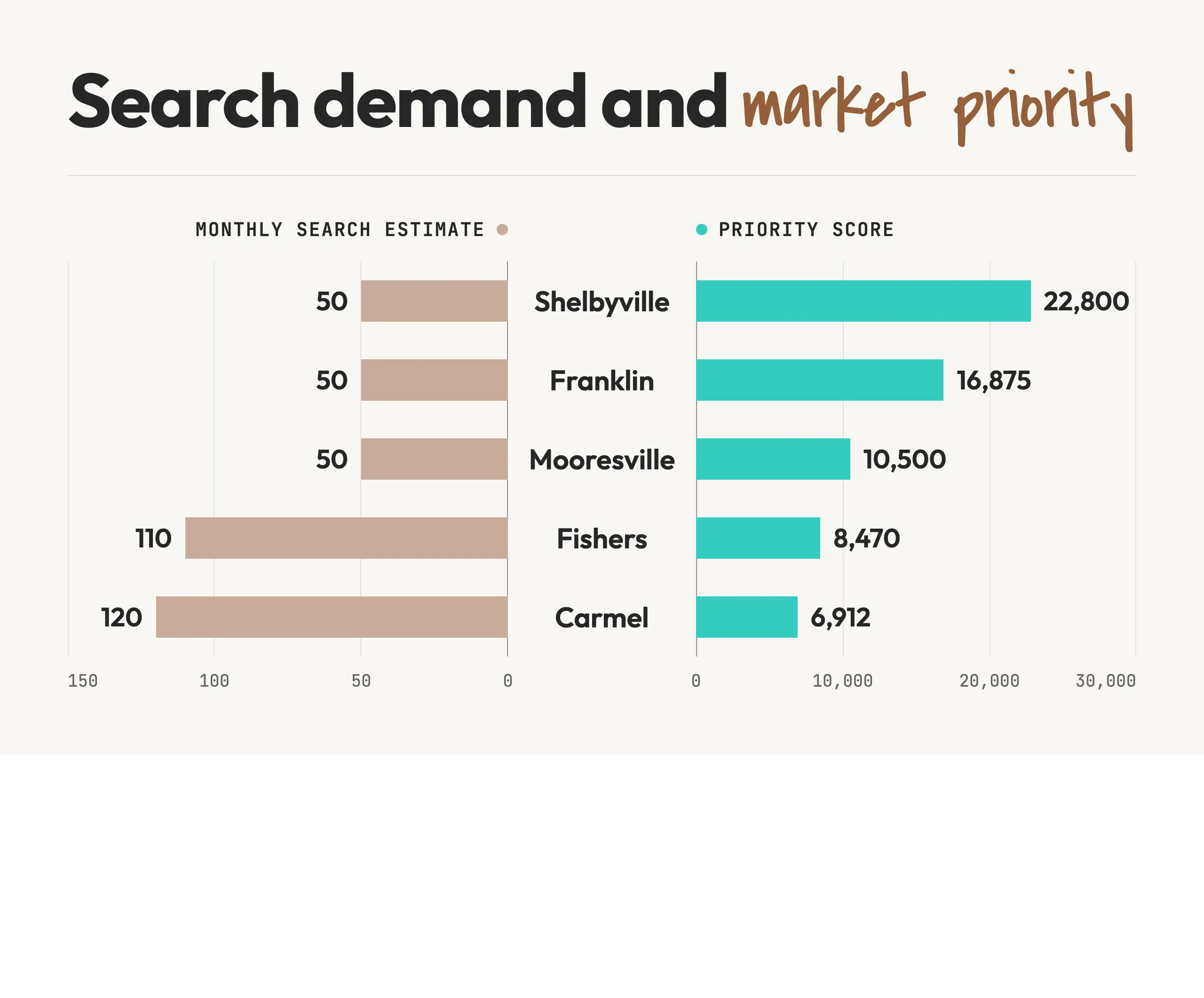
Carmel has the highest search estimate and average ticket, but ranks fifth because the example assumes strong competition and an 18% close rate. Fishers ranks fourth for similar reasons. Those towns could still be valuable, but they would require more investment relative to the company’s current performance there.
Shelbyville ranks first because its lower demand is offset by a stronger close rate and less difficult organic competition. Franklin follows with the highest close rate and relatively valuable jobs. Mooresville ranks third.
The difficulty assessment deserves a second look. Changing Shelbyville from 1 to 2 cuts its score to 11,400 and moves it behind Franklin. If a one-point change alters your initial market selection, review the competing pages again and consider the cost of testing the opportunity.
Use the List to Plan Pages and Track Results
Keep one row per town with columns for travel eligibility, capacity, demand, job value, close rate, difficulty and score. Add the source and date for each input, along with a short explanation of the town’s position. For deferred towns, record what would make them eligible.
Those notes make the list easier to use. Carmel’s explanation might identify strong organic competitors and a low local close rate. Avon might be waiting for another technician. Each requires a different business decision before additional SEO work makes sense.
Build pages for the highest-priority markets your crews can support. The content should accurately explain the services available, coverage and contact process. Add relevant job examples, photographs and customer feedback where you have them. A newly entered market may have little local job history; its page still needs useful, accurate information, with more detail added as the business completes work there.
Track search visibility alongside qualified inquiries, booked appointments and completed jobs by service address. Keep landing-page attribution available so you can examine which content attracted the inquiry without confusing that with the customer’s location.
Review performance as the pages gain visibility. A page that ranks but attracts few inquiries may have less demand than expected, an unappealing offer or weak contact options. Inquiries that fail to become jobs may point to pricing, availability or sales problems. Investigate the cause before changing the market’s score.
Update the Priorities as the Business Changes
Review the list at least annually and after significant changes in staffing, service mix or coverage. A new technician may make a deferred town practical to serve. A departure may require you to reduce promotion in an area that previously had capacity.
Reassess nearby markets when you open a legitimate location or acquire a local business. Check actual dispatch improvements, staffing and search results rather than assuming the new address will produce a particular ranking. Any additional Business Profile must meet Google’s eligibility requirements.
Competitor changes also warrant a review. An established company closing may create an opportunity, while a new entrant with substantial resources may increase the work required to compete. Update the observed conditions and the reason for the score.
Frequently Asked Questions
How Much Search Volume Does a City Need?
There is no universal minimum. A town with a small search estimate may be worthwhile when jobs are profitable, customers hire you at a good rate and competition is manageable. Low-volume keyword estimates are also imprecise. Check customer history and search results before excluding a town on volume alone.
Should I Target a City Where a Competitor Already Dominates?
Assess what it would take to compete and whether the likely work justifies that investment. Review the competitor’s organic pages separately from its map-pack presence. A nearby office may help its Maps visibility without explaining all of its organic performance. Strong competition may justify a smaller initial test or a later priority.
What if I Have No Google Ads Conversion Data?
Use keyword estimates for search demand, completed jobs for value, and qualified lead outcomes for close rate. Review organic results manually or with a geographic rank tracker. Invoices show where you already win work, but they do not measure all the demand in towns where you have little visibility.
Should I Score Every Suburb Separately?
Score a town separately when it has a distinct search opportunity and would receive its own page. Smaller neighborhoods may fit within a broader city page. Use actual service addresses and community boundaries when grouping records; ZIP codes do not always match municipal boundaries.
Get Help Choosing Your Target Markets
Valve+Meter helps contractors compare search opportunities with job value, customer conversion and service capacity. We use that information to prioritize markets and plan the pages and supporting SEO work each needs.
Bring your service-area list and the job and lead records you have. We can help identify promising markets, gaps in the data and the practical limits on expansion.
Your job history is a useful starting point for deciding which cities deserve their own pages. Completed work, local customers, job photos and technician coverage give each page something useful to say. Use this four-part test to prioritize your strongest markets, group others on regional pages and add city pages as your local evidence grows.
City pages can help homeowners choose a contractor, but thin pages that mainly send visitors elsewhere can create problems. Learn how Google describes doorway abuse, how to assess your own city pages, and how to distinguish an indexing issue from a manual action before deciding what to improve or remove.
Local SEO rankings are shaped by a mix of Google Business Profile signals, reviews, website relevance, links, citations, user behavior, and proximity—but those factors do not carry the same weight in Maps, localized organic results, and AI search. This guide explains the major local SEO ranking factors, how Google’s relevance, distance, and prominence model fits together, and why businesses should use ranking-factor research as a diagnostic tool rather than a universal checklist. It also looks at how priorities change for home service companies, multi-location brands, and service-area businesses competing across large geographic markets.